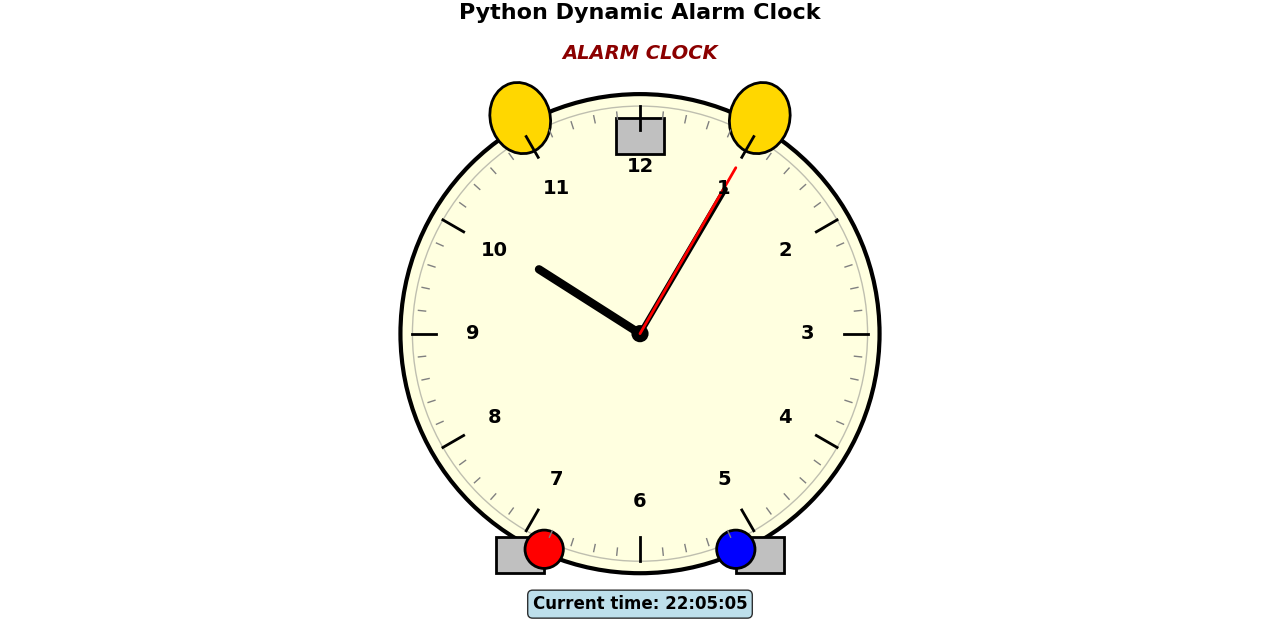
python画动态闹钟

import matplotlib.pyplot as plt
import matplotlib.patches as patches
import numpy as np
from datetime import datetime
import matplotlib.animation as animation

# 创建图形和坐标轴
fig, ax = plt.subplots(figsize=(8, 8))
ax.set_xlim(-1.2, 1.2)
ax.set_ylim(-1.2, 1.2)
ax.set_aspect('equal')
ax.axis('off')

# 设置标题
ax.set_title('Python Dynamic Alarm Clock', fontsize=16, fontweight='bold', pad=20)

# 绘制静态部件(不会随时间变化的部分)
def draw_static_parts():
    # 闹钟外框
    clock_face = patches.Circle((0, 0), 1.0, facecolor='lightyellow', edgecolor='black', linewidth=3)
    ax.add_patch(clock_face)

    # 内圈
    inner_circle = patches.Circle((0, 0), 0.95, facecolor='none', edgecolor='gray', linewidth=1, alpha=0.5)
    ax.add_patch(inner_circle)

    # 铃铛
    left_bell = patches.Ellipse((-0.5, 0.9), 0.25, 0.3, angle=15, facecolor='gold', edgecolor='black', linewidth=2)
    right_bell = patches.Ellipse((0.5, 0.9), 0.25, 0.3, angle=-15, facecolor='gold', edgecolor='black', linewidth=2)
    ax.add_patch(left_bell)
    ax.add_patch(right_bell)

    # 铃铛支撑
    bell_support = patches.Rectangle((-0.1, 0.75), 0.2, 0.15, facecolor='silver', edgecolor='black', linewidth=2)
    ax.add_patch(bell_support)

    # 脚
    left_foot = patches.Rectangle((-0.6, -1.0), 0.2, 0.15, facecolor='silver', edgecolor='black', linewidth=2)
    right_foot = patches.Rectangle((0.4, -1.0), 0.2, 0.15, facecolor='silver', edgecolor='black', linewidth=2)
    ax.add_patch(left_foot)
    ax.add_patch(right_foot)

    # 时间刻度(修正角度:12点在90度,3点在0度,6点在270度,9点在180度)
    for i in range(12):
        angle = i * 30  # 每小时30度
        # 从90度开始(12点),顺时针减少角度
        rad_angle = np.radians(90 - angle)  # 注意:减去角度,因为数学坐标是逆时针增加

        # 小时刻度
        inner_x = 0.85 * np.cos(rad_angle)
        inner_y = 0.85 * np.sin(rad_angle)
        outer_x = 0.95 * np.cos(rad_angle)
        outer_y = 0.95 * np.sin(rad_angle)

        ax.plot([inner_x, outer_x], [inner_y, outer_y], color='black', linewidth=2)

        # 小时数字
        if i == 0:
            hour_num = 12
        else:
            hour_num = i

        text_x = 0.7 * np.cos(rad_angle)
        text_y = 0.7 * np.sin(rad_angle)
        ax.text(text_x, text_y, str(hour_num), fontsize=14, fontweight='bold',
                ha='center', va='center')

    # 分刻度
    for i in range(60):
        angle = i * 6  # 每分钟6度
        # 从90度开始(12点)
        rad_angle = np.radians(90 - angle)  # 减去角度,顺时针

        if i % 5 != 0:
            inner_x = 0.9 * np.cos(rad_angle)
            inner_y = 0.9 * np.sin(rad_angle)
            outer_x = 0.93 * np.cos(rad_angle)
            outer_y = 0.93 * np.sin(rad_angle)

            ax.plot([inner_x, outer_x], [inner_y, outer_y], color='gray', linewidth=1)

    # 按钮
    button1 = patches.Circle((-0.4, -0.9), 0.08, facecolor='red', edgecolor='black', linewidth=2)
    button2 = patches.Circle((0.4, -0.9), 0.08, facecolor='blue', edgecolor='black', linewidth=2)
    ax.add_patch(button1)
    ax.add_patch(button2)

    # 闹钟标签
    ax.text(0, 1.15, "ALARM CLOCK", fontsize=14, ha='center', fontweight='bold',
            color='darkred', style='italic')

# 绘制静态部件
draw_static_parts()

# 初始化指针和文本
hour_hand, = ax.plot([], [], color='black', linewidth=6, solid_capstyle='round')
minute_hand, = ax.plot([], [], color='black', linewidth=4, solid_capstyle='round')
second_hand, = ax.plot([], [], color='red', linewidth=2, solid_capstyle='round')
center_circle = patches.Circle((0, 0), 0.03, facecolor='black', edgecolor='black', linewidth=2)
ax.add_patch(center_circle)
time_text = ax.text(0, -1.15, "", fontsize=12, ha='center', fontweight='bold',
                    bbox=dict(boxstyle="round,pad=0.3", facecolor="lightblue", alpha=0.8))

# 更新函数
def update(frame):
    # 获取当前时间
    now = datetime.now()
    hours = now.hour % 12
    minutes = now.minute
    seconds = now.second

    # 计算指针角度(从90度(12点)开始,顺时针减少)
    # 时针:每小时30度,每分钟0.5度
    hour_angle = np.radians(90 - (hours * 30 + minutes * 0.5))
    # 分针:每分钟6度,每秒钟0.1度
    minute_angle = np.radians(90 - (minutes * 6 + seconds * 0.1))
    # 秒针:每秒钟6度
    second_angle = np.radians(90 - seconds * 6)

    # 更新时针
    hour_hand_length = 0.5
    hour_hand_x = hour_hand_length * np.cos(hour_angle)
    hour_hand_y = hour_hand_length * np.sin(hour_angle)
    hour_hand.set_data([0, hour_hand_x], [0, hour_hand_y])

    # 更新分针
    minute_hand_length = 0.7
    minute_hand_x = minute_hand_length * np.cos(minute_angle)
    minute_hand_y = minute_hand_length * np.sin(minute_angle)
    minute_hand.set_data([0, minute_hand_x], [0, minute_hand_y])

    # 更新秒针
    second_hand_length = 0.8
    second_hand_x = second_hand_length * np.cos(second_angle)
    second_hand_y = second_hand_length * np.sin(second_angle)
    second_hand.set_data([0, second_hand_x], [0, second_hand_y])

    # 更新时间文本
    time_str = now.strftime("%H:%M:%S")
    time_text.set_text(f"Current time: {time_str}")

    return hour_hand, minute_hand, second_hand, time_text

# 创建动画
ani = animation.FuncAnimation(fig, update, interval=1000, blit=True, cache_f
- Title: python画动态闹钟
- Author: Rxw
- Created at : 2026-01-06 21:58:00
- Updated at : 2026-01-06 22:09:41
- Link: https://rxw2023-github-io.pages.dev/2026/01/06/python画动态闹钟/
- License: This work is licensed under CC BY-NC-SA 4.0.
Comments